相机标定
相机标定
相机标定基本概念
OpenCV中的相机标定是计算机视觉中的一个重要任务,它用于确定相机的内部参数(如焦距、主点位置等)和外部参数(如相机相对于世界坐标系的旋转和平移)。 确定内部参数和外部参数
世界坐标系(world coordinate system):⽤户定义的三维世界的坐标系,为了描述⽬标物在真实世 界⾥的位置⽽被引⼊,代表真实世界的坐标。单位为m,⽤来表示。
相机坐标系(camera coordinate system):在相机上建⽴的坐标系,为了从相机的⻆度描述物体位 置⽽定义,作为沟通世界坐标系和图像/像素坐标系的中间⼀环。代表以相机光学中⼼为原点的坐标 系,⽤ Xc ● Yc, Zc 来表示, 与相机的光轴重合,单位为m。
图像坐标系(image coordinate system):为了描述成像过程中物体从相机坐标系到图像坐标系的投 影透射关系⽽引⼊,⽅便进⼀步得到像素坐标系下的坐标。 单位为m。
像素坐标系(pixel coordinate system):为描述像素点在矩阵中的位置⽽引⼊,以像素矩阵的左上 ⽅端点作为源点建⽴的坐标系,单位为pixel。 //归一化平面
陀螺仪参考坐标系 在相机坐标系中有提到,当相机发生旋转运动时,相机坐标系也会随之一起运动。因此,当相机在发生旋转运动时,想要知道物体和相机的相对位置关系变化将会变得更困难。 对此,我们想要找到一个坐标系,在相机旋转时保持不变,这就是陀螺仪参考坐标系。陀螺仪参考系通过固定在相机上的陀螺仪,实时结算相机的位姿,进而得到一个不随相机旋转的坐标系。 重点:不随相机旋转,但随相机位移
从三维坐标(世界坐标系)到二维坐标(图像坐标系)又可以分为三个步骤: (1)从世界坐标转换到相机坐标;具体过程略 (2)从相机坐标转换到图像坐标;具体过程略 (3)从图像坐标转换到像素坐标。具体过程略
四大坐标系之间的关系: 世界坐标系 – [平移] –> 陀螺仪坐标系 – [旋转] –> 相机坐标系 – [投影] –> 像素坐标系
摄影摄像机:
是与现实生活中摄像机硬件设备对应的最普遍的相机模型,可以用摄影几何的工具研究相机模型的构造
摄像机矩阵
几何模型的参数包含内参数和外参数
内参数:
是摄像机固有参数,从出厂时刻就伴随而来。如果不发生硬件系统的改变,内参数标定获得之后,可以长期使用
包括:主距,主点,畸变参数
外参数:
是 反映摄像机在物理世界坐标系中的位置和姿态参数,是一个和观测任务和观测场景相关的参数
失真畸形
光线穿过透镜会在感光器件平面上产生非线性失真,将其称为图像的失真畸形 焦距越短,失真越明显 畸变参数:无畸变图像,正径向畸变-桶形,负径向畸变-枕形,切向畸变 径向 半径方向
透视成像
镜头畸变的解析方程
径向畸变参数
切向畸变参数
张正友标定法
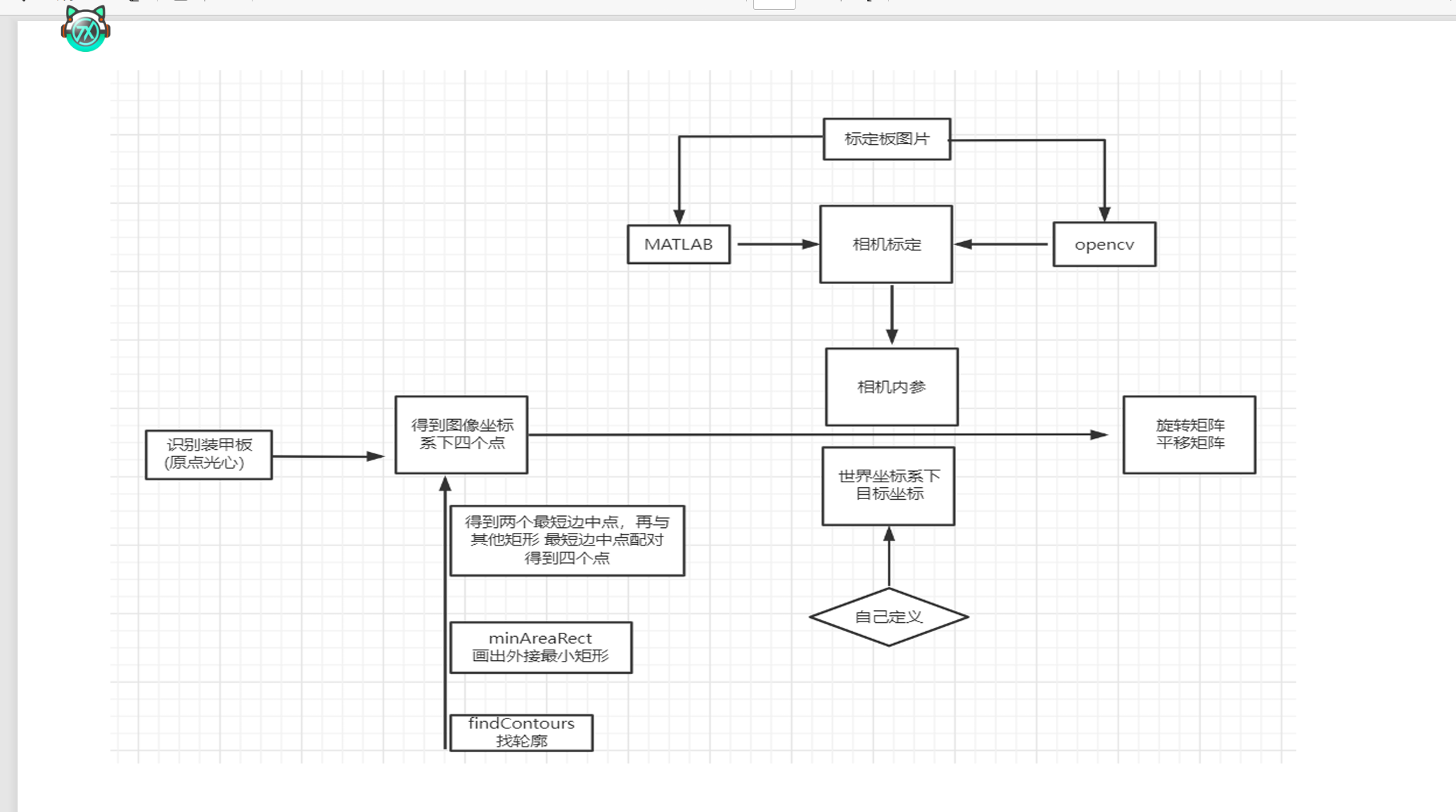
装甲板识别
image.png
labelme安装
Labelme安装及使用教程 Labelme是一款开源的图像标注工具,主要用于神经网络构建前的数据集准备工作。以下是基于Anaconda的安装及使用教程。 安装步骤 创建Anaconda虚拟环境 首先,打开Anaconda Prompt,输入以下命令创建一个名为labelme的虚拟环境,并指定Python版本为3.6: conda create -n labelme python=3.6 创建完成后,激活该环境: conda activate labelme 此时,运行环境已切换到labelme。 安装依赖环境 安装labelme所需的依赖库,可以使用pip或conda命令: conda install pyqt conda install pillow 如果遇到问题,可以尝试使用另一种命令。 安装Labelme 安装Labelme,可以使用以下命令: conda install labelme=3.16.2 如果conda命令失败,可以使用pip命令: pip install labelme==3.16.2 注意:一定要指定版本号3.16.2,否则在后续json到dataset的转换过程中可能会出现异常(1)(2)。 使用教程 启动Labelme 在激活的labelme环境中,输入以下命令启动Labelme: labelme 此时会弹出Labelme的操作界面。 标注图片 点击“Open Dir”按钮,选择待标注图片所在的文件夹。然后可以通过右键选择标注工具,如矩形、圆形、点和线等。标注完成后,点击“Save”按钮保存标注结果,生成的json文件建议与原图保存在同一目录下(1)(3)。 Json转Dataset 将标注好的json文件转化为数据集,首先找到labelme的json_to_dataset.py文件,路径如下: D:\Anaconda\envs\labelme\Lib\site-packages\labelme\cli 打开该文件,进行如下修改:
import argparse import json import os import os.path as osp import warnings import PIL.Image import yaml from labelme import utils import base64
def main(): warnings.warn(“This script is aimed to demonstrate how to convert the JSON file to a single image dataset, and not to handle multiple JSON files to generate a real-use dataset.”) parser = argparse.ArgumentParser() parser.add_argument(‘json_file’) parser.add_argument(’-o’, ‘–out’, default=None) args = parser.parse_args()
json_file = args.json_file if args.out is None: out_dir = osp.basename(json_file).replace(’.’, ‘_’) out_dir = osp.join(osp.dirname(json_file), out_dir) else: out_dir = args.out if not osp.exists(out_dir): os.mkdir(out_dir)
count = os.listdir(json_file) for i in range(0, len(count)): path = os.path.join(json_file, count[i]) if os.path.isfile(path): data = json.load(open(path)) if data[‘imageData’]: imageData = data[‘imageData’] else: imagePath = os.path.join(os.path.dirname(path), data[‘imagePath’]) with open(imagePath, ‘rb’) as f: imageData = f.read() imageData = base64.b64encode(imageData).decode(‘utf-8’) img = utils.img_b64_to_arr(imageData) label_name_to_value = {’background’: 0} for shape in data[‘shapes’]: label_name = shape[’label’] if label_name in label_name_to_value: label_value = label_name_to_value[label_name] else: label_value = len(label_name_to_value) label_name_to_value[label_name] = label_value
label_values, label_names = [], [] for ln, lv in sorted(label_name_to_value.items(), key=lambda x: x[1]): label_values.append(lv) label_names.append(ln) assert label_values == list(range(len(label_values)))
lbl = utils.shapes_to_label(img.shape, data[‘shapes’], label_name_to_value) captions = [’{}: {}’.format(lv, ln) for ln, lv in label_name_to_value.items()] lbl_viz = utils.draw_label(lbl, img, captions)
out_dir = osp.basename(count[i]).replace(’.’, ‘_’) out_dir = osp.join(osp.dirname(count[i]), out_dir) if not osp.exists(out_dir): os.mkdir(out_dir)
PIL.Image.fromarray(img).save(osp.join(out_dir, ‘img.png’)) utils.lblsave(osp.join(out_dir, ’label.png’), lbl) PIL.Image.fromarray(lbl_viz).save(osp.join(out_dir, ’label_viz.png’))
with open(osp.join(out_dir, ’label_names.txt’), ‘w’) as f: for lbl_name in label_names: f.write(lbl_name + ‘\n’)
warnings.warn(‘info.yaml is being replaced by label_names.txt’) info = dict(label_names=label_names) with open(osp.join(out_dir, ‘info.yaml’), ‘w’) as f: yaml.safe_dump(info, f, default_flow_style=False) print(‘Saved to: %s’ % out_dir)
if name == ‘main’: main() 将json文件放在一个目录下,然后在命令行中执行以下命令进行批量处理: labelme_json_to_dataset.exe D:\Spyder\label_dataset 执行成功后,会在指定目录下生成相应的数据集(1)(2)。
相机标定实操
启动MVS,左侧连接相机,右侧调整参数
使用matlab做相机标定 https://blog.csdn.net/weixin_45718019/article/details/105823053
相机标定——标定图像规范 https://blog.csdn.net/j_shui/article/details/77262947
点赞数据加载中
文档修订记录 8 次修订
- 197fd12 修复大小标题显示失败的bug
- 9a00af8 Fix: apply heading heuristic to 44 existing posts (26+18) - TOC now shows real sections
- edc8d79 博客界面更换 一些笑哦bug维修
- bce812d 6_28飞书文档同步更新
- 8c0c2ac 飞书同步test
- 7d34298 Add manual and sortable library
- 9402175 Improve blog layout and pinned posts
- 98d0f15 Create Hugo blog